
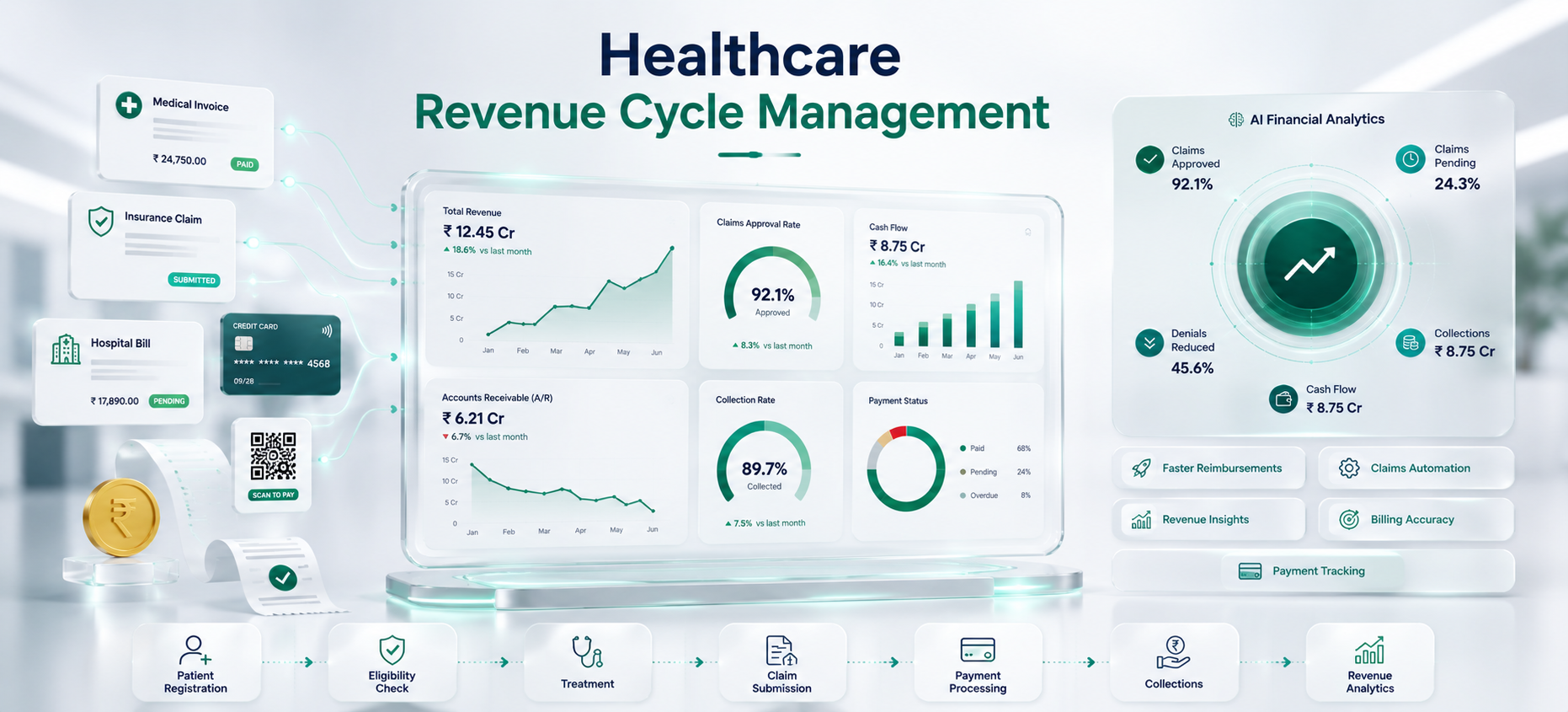
In this guide, you'll learn how healthcare RCM software works, where manual billing processes fail, and why hospitals across India and the GCC are adopting RCM automation to improve financial performance.
"Our clinicians save lives. Our billing team was saving receipts from three different systems to prove we deserved to get paid."
This reflects a common challenge for many hospitals. Revenue is often lost because of missed pre-authorizations, delayed claim submissions, manual errors, and poor claim tracking. RCM automation replaces disconnected processes with a structured workflow, helping hospitals speed up reimbursements, reduce revenue leakage, and gain complete visibility into their billing operations.
What Is Healthcare Revenue Cycle Management? A Step-by-Step RCM Workflow
Before we talk about automation, let's be clear on what the revenue cycle actually covers.
A complete RCM workflow spans every step from patient arrival to final payment:
- Patient registration — insurance verification and eligibility checks
- Charge capture — recording procedures, diagnostics, pharmacy, and room charges from clinical orders
- Medical coding — converting clinical documentation into ICD-10, CPT, and HCPCS codes
- Claims preparation — scrubbing claims and running pre-submission checks
- Claim submission — sending to TPAs, insurers, and government schemes
- Payment posting — reconciling payments, flagging underpayments
- Denial management — working rejections, filing appeals
- AR reporting — tracking days in AR, denial rates, and collection efficiency
Every single one of these steps is a potential failure point.
When even one step is manual, inconsistent, or dependent on a single staff member's memory — revenue leaks out.
Where Manual Processes Fail
Manual billing processes often lead to delays, claim denials, and revenue loss. Here are some of the most common challenges hospitals face:
- Late Eligibility Verification: Insurance eligibility issues are often discovered after treatment, leading to rejected claims and unrecoverable costs.
- Missing Claim Documents: Claims submitted without the required documents are more likely to be delayed or denied.
- Delayed Denial Follow-up: Unresolved claim denials remain pending for weeks, reducing recovery rates and increasing accounts receivable (AR).
- Revenue Lost Through Write-offs: Claims that are not appealed within the allowed timeframe often become unnecessary write-offs.
These challenges increase billing delays and reduce hospital revenue. RCM automation addresses them by verifying eligibility early, validating claims before submission, and tracking denials until they are resolved.
Top Revenue Cycle Management Automation Features Every Hospital Needs
Not all RCM software is built the same. Here are the features that make a real difference:
1. Real-Time Insurance Eligibility and Pre-Authorization Tracking
The problem: Your patient is admitted. The procedure is done. Three days later, billing discovers the pre-authorization expired on day one.
What automation does:
- Checks insurance eligibility in real time at the point of registration
- Tracks pre-authorization status and flags expiry risks before admission
- Alerts your team when authorizations need renewal — before the procedure happens
- Connects eligibility data to the billing workflow so gaps never reach the claim stage
No more post-service surprises. No more rejected batches over expired pre-auths.
2. Automated Charge Capture Linked to HIMS Clinical Orders
The problem: Charges are entered manually from clinical records. Items get missed. Wrong quantities get entered. Room charges go unrecorded for days.
What automation does:
- Pulls charge data directly from HIMS clinical orders — no manual re-entry
- Captures procedures, diagnostics, pharmacy dispensing, and room charges automatically
- Flags missing or incomplete charge data before it reaches the billing stage
- Eliminates shadow billing spreadsheets that run parallel to your main system
Every service delivered gets billed. Every charge captured. No manual gaps.
3. Claims Scrubbing Rules That Catch Common Rejection Causes Before Upload
The problem: Claims go out with errors. Payers reject them. Your team reworks and resubmits — losing days and increasing cost per claim.
What automation does:
- Runs every claim through a scrubbing engine before it leaves your system
- Checks for missing fields, coding conflicts, and payer-specific requirement gaps
- Applies configurable rules for each payer — so what Apollo Munich expects is different from what CGHS requires
- Prevents the most common rejection causes from ever reaching the payer
Higher first-pass acceptance rates. Less rework. Faster payments.
4. Denial Workflows With Reassignment, Appeals, and Audit History
The problem: Denials come in. They sit in a shared inbox. Some get worked. Many don't. The ones that expire get written off.
What automation does:
- Captures every denial automatically as it arrives — no manual logging
- Categorises by denial reason code so patterns become visible immediately
- Assigns denials to the right team member based on type, value, and payer
- Tracks appeal deadlines and sends reminders before windows close
- Attaches required documents automatically before escalation
- Maintains full audit history — who worked it, when, what was submitted
No denial goes unworked. Appeals go out complete and on time. Write-offs drop.
5. Analytics Dashboards for AR Aging, Collection Rates, and Payer Performance
The problem: Your billing head spends five days every month building the revenue report manually. By the time it reaches the CFO, the numbers are already old.
What automation does:
- Real-time dashboards covering all key metrics — AR aging, clean claim rate, denial rate, collection rate, payer performance
- Tracks trends across weeks and months so management can spot problems early
- Payer-level performance visible — see which insurers are paying slowly, denying in patterns, or underpaying against contracted rates
- Custom MIS reports formatted exactly the way your leadership team reviews them
Real-time visibility. Faster decisions. No more manual reporting exercises.
Why Revenue Cycle Management Software Must Integrate With Your HIMS
Revenue Cycle Management (RCM) software works best when it is fully integrated with your Hospital Information Management System (HIMS). Since billing depends on data from multiple departments, disconnected systems can lead to errors, delays, and revenue loss.
A connected RCM solution brings together:
- Clinical documentation from doctors and nurses.
- Pharmacy dispensing records.
- Laboratory and diagnostic reports.
- Insurance eligibility and pre-authorization details.
- Payment and financial reconciliation data.
CSoft RCM Automation integrates directly with CSoft HIMS, allowing clinical services to flow automatically into the billing process without manual data entry. It also supports insurance workflows, including eligibility verification, pre-authorizations, claim submission, and denial management through a single patient record.
The result is a connected revenue cycle that improves billing accuracy, speeds up reimbursements, and eliminates manual reconciliation across multiple systems.
Revenue Cycle Management in India and GCC: Key Billing Challenges
RCM in India and the GCC is genuinely complex. It is not the same as Western markets where a single insurer pays a standard rate.
In India:
- Hospitals juggle cash, credit, multiple TPAs, and government scheme patients — often in the same ward
- CGHS, ESI, PM-JAY, and corporate TPA requirements are all different
- Package billing, room rent capping, and co-payment calculations vary by policy
- Pre-authorization timelines differ by insurer and often change without notice
In the GCC:
- Operators deal with payer mix complexity and cross-border eligibility rules
- MOHAP, DHA, and DOH compliance requirements are mandatory
- NABIDH and Malaffi integration is increasingly required for UAE hospital networks
- Claims formats and submission protocols vary by emirate and insurer
What this means for your RCM software:
Medical billing software for India and GCC must configure local formats without breaking standard automation. Your team should not have to rebuild payer rules every quarter when formats change.
The platform adapts. The rules update in the system. Your team focuses on exceptions — not routine data entry.
How to Implement Revenue Cycle Management Software Successfully
Moving to RCM automation does not mean switching everything overnight. Here is how a structured implementation works:
Step 1 — Current State Assessment
Map your existing billing workflow. Identify where claims fail, where denials pile up, and which payers cause the most problems. This becomes the baseline for measuring improvement.
Step 2 — Workflow Configuration
Configure the system to match your payer mix, claim formats, and reporting requirements. Payer-specific scrubbing rules, eligibility check sources, and denial routing logic are all set up before go-live.
Step 3 — HIMS Integration
Connect the RCM system to your clinical and billing data sources. Charge capture automation, eligibility verification, and claims generation are linked to the same patient record your clinical team already maintains.
Step 4 — Team Training
Your billing team is trained on the new workflow. The goal is not to change how they think — it is to give them better tools for the work they already do.
Step 5 — Go-Live and Monitoring
Performance is tracked from day one. AR days, clean claim rate, denial rate, and collection efficiency are all measured before and after automation so the impact is visible and reportable.
How to Measure ROI from Revenue Cycle Management Automation
When hospitals invest in RCM automation, the results need to be measurable. Not theoretical. Not percentage improvements with no baseline.
Here are the metrics that actually matter:
- Denial rate — Track before and after automation, broken down by payer and denial reason
- Average days in AR — Track weekly and look for consistent reduction over 90 days
- First-pass claim acceptance rate — Should improve within the first billing cycle
- Write-off percentage — Should decrease as denial follow-up becomes structured
- Cost per claim — Total billing team cost divided by claims processed
- Collection rate — Collections as a percentage of net patient revenue
The honest ROI picture:
Hospitals that invest in structured RCM typically recover the software cost within months — through reduced write-offs and faster collections.
The savings come from:
- Fewer claims rejected at first submission
- More denials successfully appealed
- Underpayments caught and recovered
- Billing staff time shifted from manual entry to exception handling
Your billing team focuses on the hard cases that genuinely need human judgment. The system handles the routine work.
Final Word
Revenue Cycle Management is more than a billing function. Manual billing processes, delayed claim follow-ups, and untracked denials can lead to revenue loss, slower payments, and unnecessary administrative work.
The right RCM solution helps hospitals automate billing, reduce claim denials, improve cash flow, and gain better visibility into financial performance.
We will show you exactly how the system works — before you commit to anything. 👇